
 The file your whole team relies on may belong to someone who no longer works for you.
Part 1 of 3.
On an ordinary Tuesday morning, John, a staff accountant at Dana’s forty-person accounting and advisory firm, clicked the link he clicked every day.
It opened the firm’s client deadline tracker, the one spreadsheet that showed which clients had filings due, which were waiting on documents, and who on the team owned each one.
This time there was no tracker. There was a plain white page that read: “This item might not exist or is no longer available.”
John tried again.
He asked the person at the next desk. Within twenty minutes half the office was clicking the same dead link, and Dana was standing in the conference room doorway asking the only question that mattered: “Where did it go?”
It should have been a ten-minute answer. It took most of two days. Dana’s first call went to her IT provider’s help desk, and the first questions were the reasonable ones.
Had anything changed on the firm’s side? Was Microsoft having an outage? Who owned the file? That is where it stalled.
Dana assumed it lived on “the shared drive.” The office manager thought it was in a Teams site. John only knew the link.
Three calls, a screen share, and an escalation later, nobody had found the file, and the conversation had quietly shifted from what happened to whose fault it was. The provider asked who had changed the sharing settings.
The operations manager asked why a file the whole firm used could vanish without warning. Someone asked to see the written procedure for removing a user, and the provider asked who had approved the request.
Meanwhile partners and staff were calling each other to reconstruct the day’s deadlines from memory. The office had stopped working and started investigating.
Late Tuesday, a name finally surfaced.
Six weeks earlier, Marcus, the senior manager who had built the tracker years ago, had left the firm.
The provider pulled his departure ticket, and it was clean. HR had asked IT to remove his access.
IT disabled his sign-in, removed his Microsoft 365 license so the firm would stop paying for it, and thirty days later deleted his account, exactly as the offboarding checklist said.
Nobody had skipped a step, and that was the problem: the checklist never asked what the departing employee owned. Marcus had built the tracker in his personal OneDrive and shared it with everyone by link, because that was the easiest thing to do.
When his account went away, the tracker went with it. The argument ended not with a culprit but with an awkward silence, and a day and a half nobody would get back.
Wednesday went to recovery, and it went badly.
The provider opened a case with Microsoft. The answer was short: the window for restoring a deleted account is limited, often 30 days or less depending on the plan and how it was set up, and this one had closed.
Then came the hunt for a copy.
Eleven people searched their email, desktops, and Downloads folders, and “does anyone have a recent copy?” went around the firm three times. There wasn’t one. Nobody had ever emailed the tracker, because nobody needed to.
They had shared a link, and a link is only a pointer to a file in someone else’s account. The best anyone found was a printout in an old meeting folder, five months out of date.
Somewhere in the middle of Wednesday’s call, the provider said something Dana had half forgotten. Two years earlier, at a service review, they had recommended a separate backup for Microsoft 365: an independent copy of the firm’s cloud data, kept outside Microsoft’s service.
The price was just under $400 a month for the entire firm. Dana had asked what it protected against, heard “accidental deletion and departing employees,” and said no.
Microsoft was a household name, the data was already in the cloud, and she couldn’t see a reason to pay for the same protection twice. The provider still had the proposal and her reply on file.
Nobody enjoyed that part of the call. It wasn’t the same protection twice. One service kept the platform running. The other would have kept a copy of the firm’s work.
Then came the part no invoice shows.
The tracker held every client’s filing deadline, who owned the work, and what was waiting on documents, and it existed nowhere else. For two weeks, senior staff were pulled off client work to rebuild it from engagement letters, old emails, and memory, just as the busiest season approached.
Nobody could see which returns were waiting on documents.
Two managers chased the same client while a third was never called. Handoffs stalled because no one was sure who owned what. Some of what Marcus carried in his head never came back.
Two filings were nearly missed, and one went in late, leaving a client with penalties the firm decided to cover and an uncomfortable call to explain why.
Add it up: the calls, the escalations, the search, the finger-pointing, and the rebuild came to well over a hundred hours of the firm’s and its provider’s time in under three weeks.
The protection Dana declined cost less than $5,000 a year. The cleanup cost more than a full year of it in staff time alone, before counting the penalties and a client’s trust.
Nothing in this story is unusual. Dana’s firm used a respected platform, followed a sensible checklist, and still lost something it couldn’t operate without. The question nobody had asked was not about Marcus.
It was: where does our business data actually live, who owns it, and who is protecting it?
"We're in the Cloud" Is Not the Same as "We're Backed Up"
Microsoft 365 and Google Workspace are excellent services. Think of them as renting space in a well-managed office building.
The landlord keeps the lights on, the elevators running, and the doors locked, but does not copy what is in your filing cabinets.
Protecting your data from deletion, a departing employee, a mistake, or ransomware that syncs from a laptop is a different job, and it is generally yours.
Recycle bins, version history, and retention settings help with quick mistakes, but they are not a backup. How long deleted items stay recoverable depends on the plan you pay for and how it was configured, and many businesses never configured it at all.
Whose File Is It? The Question Hiding in Every Shared Link
Both platforms have personal storage and company storage, and the difference is where Dana’s problem started.
A shared link grants access, but it never transfers ownership. The file belongs to whichever account holds it.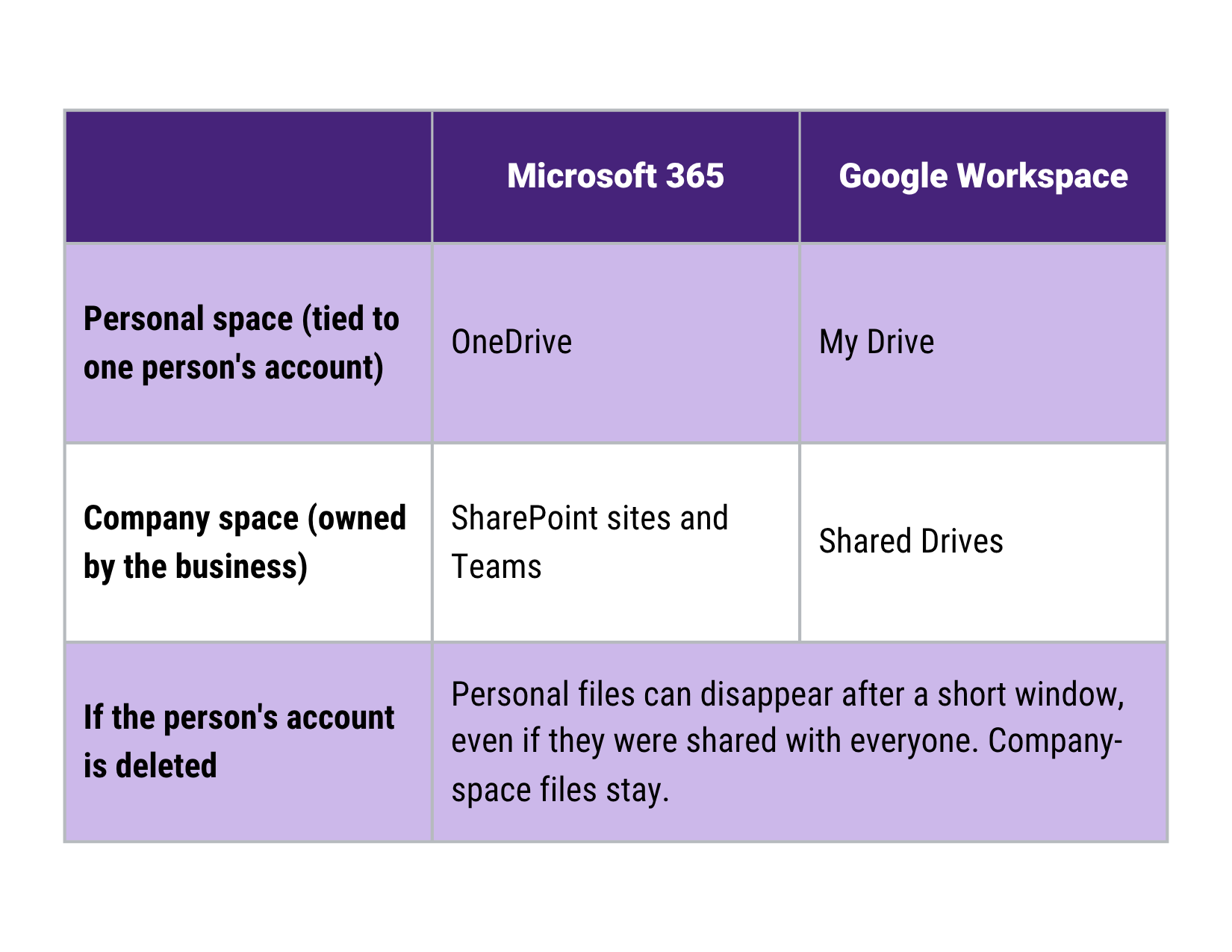
The Fix Starts on Day One, Not on the Last Day
Offboarding problems are created at onboarding. New employees get a laptop and a login and rarely any guidance on where work files should live, so they save things where it is easiest: their own personal space.
Two years later, that habit is a business dependency.
At onboarding
Tell people where work lives. In plain words: team files go in shared company spaces, and personal storage is for personal drafts.
Make the right place the easy place. Set up team spaces before they’re needed, and grant access by role rather than one-off sharing, so the business keeps working when people change.
At offboarding
Review before you delete. Identify which files, shared links, and mailboxes the business depends on, and move them into a company-owned space with a role or team as owner, not an individual.
Give it a review period. Keep the person’s files reachable by their manager for a short, defined window before anything is deleted, long enough for someone to say, “we still need that.”
Close the account last, with a sign-off. Someone on the business side confirms the hand-off is complete.
What This Actually Does for You
The real decision in this story was never technical, and it belongs to the owner, not to IT.
A separate backup turns an open-ended loss of staff time, penalties, and client trust into a small, predictable monthly cost.
It lets people leave, on good terms or bad, without the business depending on their accounts, and it gives you a factual answer when a client, lender, or cyber insurer asks how your cloud data is protected.
Four Questions to Ask This Week
If an employee’s account were deleted today, what would we lose, and for how long could we get it back?
Is our Microsoft 365 or Google Workspace data backed up by someone other than Microsoft or Google? If our IT provider has ever recommended it, what did we decide, and why?
Which files and spreadsheets does the business truly depend on, and do they live in company-owned spaces or in someone’s personal storage?
What would a week without our most important shared files cost us, compared with the monthly cost of protecting them?
A good answer is specific: a location, a date, and a name. If what you hear is “I think Microsoft handles that,” you have found the gap before it found you.
This is the thinking behind how BizCom Global approaches data backups, disaster recovery, and business continuity planning, including for cloud platforms where “someone else runs it” is easy to mistake for “someone else protects it.”
It also connects to a broader cybersecurity strategy. For more on the assumptions that catch leaders off guard, read The 3 Worst Assumptions Leaders Make About Backups.
Next in the series:
Dana’s firm came out of the tracker scare with a hard lesson and a costly two weeks.
Part 2 follows what happened when the problem wasn’t one missing file but a Monday morning ransomware attack on the servers down the hall.
Dana and her firm are a composite, illustrative scenario built from patterns seen across the industry, not a specific documented client incident.