

Why use case, software compatibility, security, lifecycle planning, and managed support matter more than the sticker on the box.
Buying a business computer, laptop, or desktop should be simple: pick the model with the biggest number on the sticker, swipe the card, and move on.
Unfortunately, that is how companies end up with the technology equivalent of buying a sports car to pull a trailer, or a pickup truck to commute two blocks to the coffee shop.
The right computer is not always the most expensive one, or the one that looks best on paper. It is the one that fits the job, the user, the software, the lifecycle, and the way the device will be managed over time. This is where many business purchases go sideways: they focus on the machine instead of the work.
That is why, at BizCom Global, we look at computers less like gadgets and more like business tools.
A carpenter may own a framing hammer, a finish hammer, a circular saw, and a cabinet saw. To someone outside the trade, they may all look like tools. To the person doing the work, the differences matter.
Computers are the same. The better question is not “What is the best laptop?” It is “What does this person need to accomplish every day, and what could slow them down, create risk, or make support harder if we choose poorly?”
Start With the Job, Not the Computer
A business computer should be selected around the role of the user.
A front-office employee who works mostly in Microsoft 365, email, browser-based applications, and a line-of-business system has very different needs than someone working in accounting, design, engineering, data analysis, or video-heavy marketing work.
Both people may need reliable machines, but they do not need the same machine.
The same is true with computers. An underpowered machine may function during setup, but after months of browser tabs, Teams meetings, security software, updates, spreadsheets, customer portals, secure access requirements, and cloud sync clients, it can become a daily drag on the work.
Nobody budgets for “small moments of frustration,” but across a team those moments show up as slower responses, longer tasks, and more interruptions.
Software Compatibility Is the Part People Skip
Before choosing a computer, start with the programs.
What accounting system does the company use?
Are there industry-specific applications, estimating tools, graphics and CAD software, tax programs, security agents, printer drivers, scanners, electronic signature pads, or legacy applications that still matter to daily operations?
This matters even more as new types of business computers enter the market. Some AI-focused laptops and newer processor designs offer strong battery life and performance, but they may not be the right fit for every environment.
Specialized software, older drivers, security tools, remote access requirements, printers, scanners, and other connected devices should be checked before purchase.
That does not make those computers bad.
In the right use case, they can be excellent. But they should not be purchased casually for someone who depends on specialized applications until compatibility has been verified.
A laptop can have great battery life, a beautiful screen, and a futuristic processor, but if it cannot run the one program the employee uses to produce revenue, it is a very attractive paperweight.
The Details That Usually Matter
For most modern business users, the baseline is no longer the cheapest machine on the shelf. The right configuration depends on the role, but these are the considerations that usually deserve attention:
Processor, memory, and storage: Many business users should start with Windows 11 Pro, a current Intel Core i5/i7 or AMD Ryzen 5/7-class processor, at least 16 GB of memory, and a solid-state drive. Power users may need 32 GB of memory, more storage, dedicated graphics, or a workstation-class device.
Graphics and display quality: Designers, engineers, analysts, and video-heavy marketing users may care more about graphics capability, screen quality, color accuracy, and resolution than someone who mainly works in email, Microsoft 365, and browser-based systems.
Portability and screen size: A larger screen can improve comfort and productivity, while a lighter device may matter more for travel, field work, or moving between offices, conference rooms, and home.
Security and sign-in: Fingerprint readers, facial recognition, encryption support, and secure sign-in options can improve convenience while supporting stronger security habits.
Connectivity and accessories: Docking stations, monitors, built-in cellular internet, battery life, printers, scanners, signature pads, and other peripherals should be considered before the purchase, not discovered after rollout.
Quantity and standardization: Buying one computer is a shopping decision. Buying ten, twenty, or fifty is an operational decision. The more devices involved, the more important standard models, spares, warranties, deployment time, and replacement planning become.
Business-Class Is Different From Consumer-Class
Two computers can have similar-looking specifications and still be very different business purchases.
The difference is often less about the sticker specs and more about supportability, consistency, security, and lifecycle.
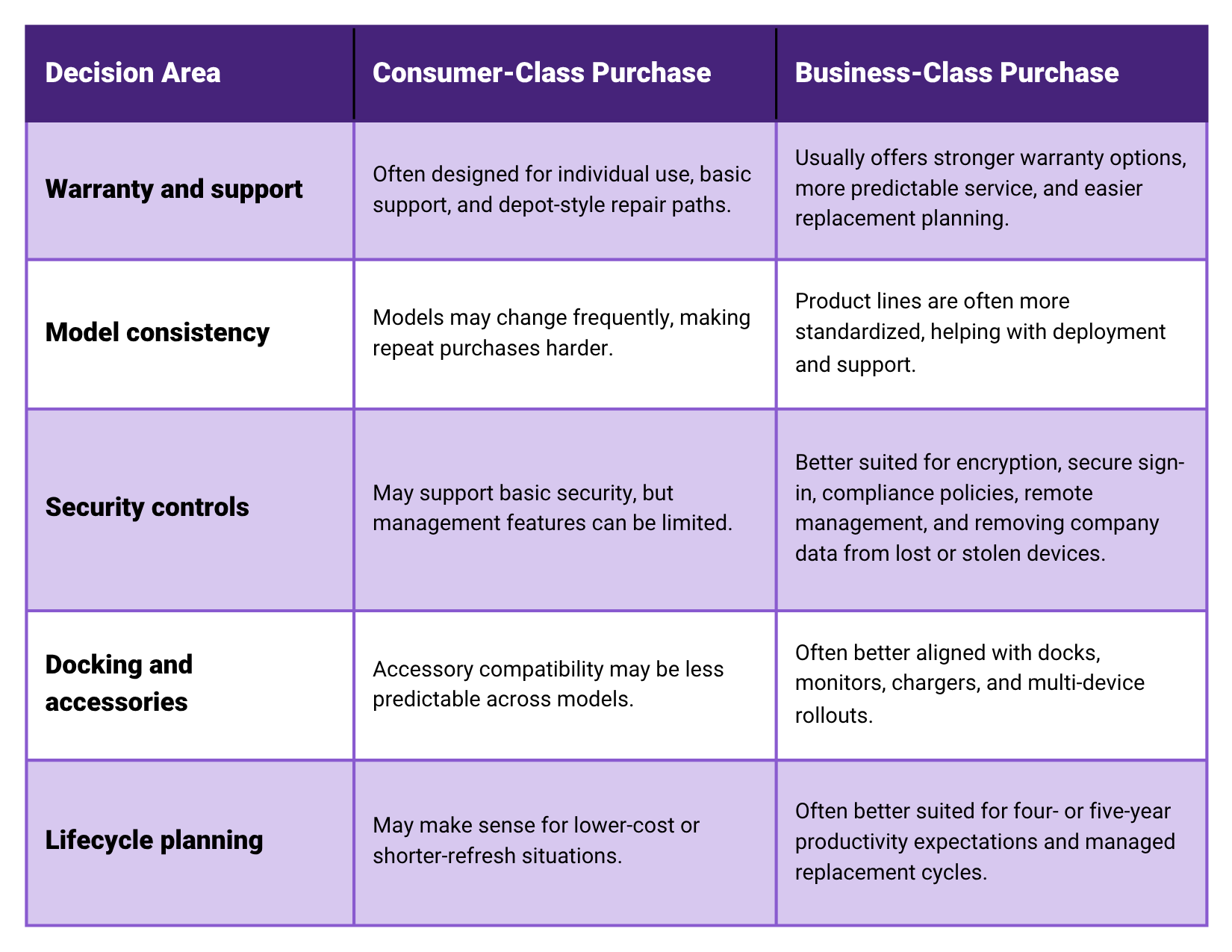
The table also points to a larger issue: lifecycle cost. Business equipment pricing has risen, so companies should be intentional about how long each device is expected to remain productive.
Some choose lower upfront cost and a shorter refresh cycle. Others invest in stronger business-class systems designed to last four or five years.
Neither approach is automatically wrong, but a cheap device that frustrates a user for three years is not cheap, and a premium device that is overbuilt for the role may not be smart either.

Do Not Forget the Life After Purchase
A computer purchase is not finished when the box is opened. The device needs to be configured correctly, secured, updated, backed up where appropriate, and enrolled into the company’s management tools.
It should have the right access controls, encryption, endpoint protection, and recovery plan before it becomes part of daily operations.
Backups deserve a special mention. Not everything on every device must be backed up the same way, especially in a well-designed cloud environment.
But every company should know where its data lives, what is protected, how quickly it can be restored, and what happens if a laptop is lost, stolen, damaged, or encrypted by ransomware.
“We thought it was in OneDrive” is not a recovery strategy.
It is the kind of sentence people say after something has already gone wrong.
The BizCom Global Way: Fit, Manage, Protect
Choosing a business computer is first a productivity decision, but it is also a resilience decision.
It affects how easily people work every day, how consistently the device can be supported, how well company data is protected, and how quickly the business can recover when something goes wrong.
A good choice fades into the background and lets people work.
A bad choice becomes a character in every story: the laptop that freezes during client calls, the workstation that cannot run the required software, or the bargain machine that needed replacing long before anyone expected.
Our view is simple: fit the computer to the work, manage it like a business asset, and protect it like it matters.
That is where a managed IT services partner can help: not by selling the biggest computer, but by helping the business standardize, secure, monitor, back up, and replace equipment in a way that supports how the company actually operates.
The device may be sitting on one employee’s desk, but it connects to company data, customer information, workflows, communication, and revenue. That makes it part of the business environment, not just a piece of equipment.
Before buying the next round of computers, ask the practical questions up front.
What does each user actually do?
Which applications must work without compromise?
Does the role require better graphics, a higher-quality display, a larger screen, portability, biometric sign-in, cellular connectivity, or specialized peripherals?
How many machines are being purchased, should they be standardized, and is the company buying for a shorter refresh cycle or a four- to five-year productive lifecycle?
How will the device be secured, monitored, patched, supported, backed up, and eventually replaced?
That is the point of choosing technology well. The goal is not to buy the most impressive machine.
The goal is to buy the right machine, configure it properly, manage it consistently, and make sure the business can keep moving when something inevitably goes wrong.